Live Monitoring of Flex Members
Live Monitoring allows Supervisors to monitor their Flex Members by joining live calls between the Flex Member and the customer, with the option to do the following:
|
■
|
Listen to the conversation. |
|
■
|
Supervisors can assist Flex Members by speaking privately (whisper) to them during the conversation. |
|
■
|
Supervisors can join the conversation directly (barge-in). |
|
➢
|
To monitor a Flex Member: |
|
1.
|
Select the required queue. |
|
2.
|
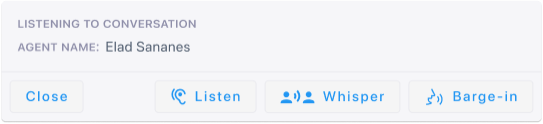
Click the Live Monitoring button corresponding to the required channel of the Flex Member; the following pop-up appears: |
|
3.
|
Click one of the following buttons: |
|
●
|
Listen - to listen to the conversation. |
|
●
|
Whisper - to speak privately to the Flex Member (Customer doesn't hear) during the conversation. |
|
●
|
Barge-in - to join the Flex Member and customer conversation. |